Quick answer: Our top pick for marketers and brand teams who want beautiful surveys that are on-brand is SurveyLegend. It’s easy to use, offers multiple themes, many custom branding options and no design skill is needed. Typeform, Paperform, QuestionPro, or SurveyMonkey are worth a look if you want a different design look, are looking for ecommerce capabilities, or need deeper data analysis.
Editor’s note: This article is a summary of publicly available product information and verified third-party user reviews. We did not test these platforms ourselves. Rankings and recommendations reflect our editorial assessment and are subjective.
Most survey forms are designed to collect data, not to look good. And this works, but there comes a time when you want your survey to look a lot more like your brand. A normal, generic form would look out of place compared to an otherwise polished and well-designed website. For many users, filling out a survey form is the first time interacting with a company outside of the website or social media pages, so that other brand impression also matters.
Companies that want to stand out from the crowd lean towards creating surveys that feel on-brand. The good news is that there are tools that help with just that. We have compiled and compared the leading online survey platforms popular for branded surveys based on branding range, ease of use, price, and design range.
Online tools for beautiful, branded surveys at a glance
|
Tool |
Best For |
Free Version? |
What the Free Version Option is Good for |
|
SurveyLegend |
Mobile-friendly, beautiful, branded surveys |
Yes |
Accessing and testing the 70+ pre-designed themes on a real, live survey.
|
|
Typeform |
Conversational and engaging surveys |
Yes |
Trying the conversational one-question-at-a-time layout firsthand. |
|
SurveyMonkey |
Market research and professional businesses |
Yes |
Testing basic pre-made templates for low-volume surveys |
|
SurveySparrow |
Chat-like customer engagement surveys |
Yes |
Creating chat-style survey formats for small projects |
|
QuestionPro |
Research and enterprise-grade surveys |
Yes |
Running a small research project with up to 200 responses. |
|
Paperform |
E-commerce-related surveys |
Yes |
Testing its document-style layouts with basic color and layout customization |
|
involve.me |
Quizzes and lead capturing |
Yes |
Trying out the platform with a visual quiz on a small campaign |
|
Jotform |
Professional-grade forms like payments and |
Yes |
Full form-design control on the free plan, though Jotform’s own branding stays on free forms. |
|
Zoho Forms |
Data collection and workflow automation |
Yes |
Full access to the layout engine and standard theme library |
|
Google Forms |
Fast data collection |
Yes |
Running minimalist, mobile-responsive surveys |
How we chose the tools
Our ranking pulls on publicly available pricing pages, product documentation, and user reviews, and not individual testing for each tool.
Worth noting: usability research from the Nielsen Norman Group finds that following basic usability practices supports completion, so branding should sit on top of a usable base.
SurveyLegend – Best overall
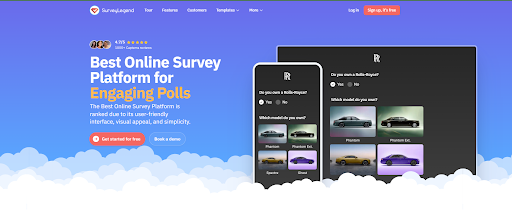
SurveyLegend is an online survey platform for people and businesses of all sizes that makes beautiful, on-brand, mobile-first surveys without coding or design skills. It comes first because design sits at its core: 70+ professionally designed themes, an easy drag-and-drop builder, 20+ question types with logic and branching, custom branding and white-label options, image and video question types (including picture-rating), and AI survey creation and data analysis. SurveyLegend holds a 4.4/5 rating from 562 reviews on G2 and is used by teams at L’Oréal, Harvard, PayPal, Adobe, and Sony. A free Starter plan lets you build and publish up to 3 surveys before upgrading.
Pros
- 70+ themes
- White-label branding
- AI survey creation and analysis
Cons
- Paid plan for deeper analytics and some exports
- No offline survey collection
Typeform – Best for a conversational feel
Typeform has a one-question-at-a-time approach that users say is polished, intuitive, and easy to build.
Pros
- Conversational
- Easy to create
Cons
- Limited free responses
- Expensive pricing
SurveyMonkey – Best for deep analytics
SurveyMonkey has a well-organized template library and strong reporting on the paid tier for in-depth data analytics.
Pros
- Large template library
- Advanced paid reporting
Cons
- Limited free tier
- No design flexibility
SurveySparrow – Best for chat-style feedback
SurveySparrow features a chat-like format that encourages survey completion with offline collection.
Pros
- Chat format built for completion
- Offline data collection
Cons
- Drag-and-drop alignment issues
QuestionPro – Best for research-heavy projects
QuestionPro is more research-heavy, with a plain, functional design. Paid plans add robust security features like GDPR and SOC 2 compliance.
Pros
- Permanent Essentials free plan
- Strong compliance and security options
Cons
- Plain design
- Paid plans need sales quotes
Paperform – Best e-commerce-ready forms
Paperform has a document-style with polished-looking results, and many custom domains for several branded surveys.
Pros
- Polished document-style design
Cons
- Expensive custom domains
involve.me – Best for quizzes
Involve.me is ideal for quizzes, calculators, and lead funnels. Its AI functionality allows ease of use from prompts.
Pros
- Built for quizzes and funnels
- Easy, AI-assisted setup.
Cons
- Branding can’t be fully removed, even on paid plans.
Jotform – Best for professional-grade surveys
Jotform does more than surveys by handling professional aspects like payments, e-signatures, and compliance forms, and has a large template library.
Pros
- Additional features like payments and e-signatures
- Large template library
Cons
- Minimalistic designs
- Jotform branding sticks on the free plan
Zoho Forms – Best for workflow automation
Zoho Forms puts workflow automation first over visuals, with a basic, clean design. Ideal for teams already using Zoho.
Pros
- Advanced workflow automation
- Low starting price
Cons
- Steep learning curve
Google Forms – Best free option
Google Forms is the simplest option that is easy to use with no learning curve. It is also completely free.
Pros
- Completely free
- No learning curve
Cons
- Basic, minimalistic themes
- No white-label option
FAQ
What is the best survey tool for beautiful surveys?
SurveyLegend, as it is design-central with its 70+ theme library and drag-and-drop builder that’s easy to use.
Is there a good white-label survey maker?
Yes. SurveyLegend is a strong option because you can completely remove the tool’s branding, include your own logo, and customize backgrounds, colors, and fonts.
Is SurveyLegend free?
Yes. There is a free Starter plan that allows for survey testing. Deeper analytics and exports need a paid plan, though.
Final verdict
SurveyLegend is the top option all-round if you want surveys that feel on-brand and as close to your website as possible, without a design team and a large budget.
About The Author